Thursday, December 22, 2011

Monday, December 19, 2011


Acer Aspire One Happy2 Netbook (ep.2)
Specification
 Genuine Windows®7
Starter – Intel® Atom™ Processor N570 (1.66GHz, 1MB L2 cache, 667MHz
FSB) – 1GB DDR3 SDRAM – 250GB hard drive – 10.1″ Widescreen CineCrystal™
LCD display (1024 x 600) – Intel® Graphics Media Accelerator 3150 –
Mobile Intel® NM10 Express – high-definition audio support – built-in
stereo speakers – webcam – multi-gesture touchpad – USB – 802.11b/g/n
WLAN – 10/100 LAN – Multi-in-1 card reader – 6-cell battery – 1-year
limited warranty.
Genuine Windows®7
Starter – Intel® Atom™ Processor N570 (1.66GHz, 1MB L2 cache, 667MHz
FSB) – 1GB DDR3 SDRAM – 250GB hard drive – 10.1″ Widescreen CineCrystal™
LCD display (1024 x 600) – Intel® Graphics Media Accelerator 3150 –
Mobile Intel® NM10 Express – high-definition audio support – built-in
stereo speakers – webcam – multi-gesture touchpad – USB – 802.11b/g/n
WLAN – 10/100 LAN – Multi-in-1 card reader – 6-cell battery – 1-year
limited warranty. - Operating System
Operating System Genuine Windows® 7 Starter - Processor & Chipset
Processor Manufacturer Intel Processor Type Atom Processor Model N570 Processor Speed 1.66 GHz Cache 1 MB Chipset Manufacturer Intel Chipset Model NM10 Express - Memory
Standard Memory 1 GB Memory Technology DDR3 SDRAM Memory Standard DDR3-1066/PC3-8500 Number of Total Memory Slots 1 Memory Card Reader Yes Memory Card Supported Memory Stick PRO
xD-Picture Card
Memory Stick
MultiMediaCard (MMC)
Secure Digital (SD) Card - Storage
Hard Drive Capacity 250 GB Hard Drive Interface Serial ATA Hard Drive RPM 5400 - Display & Graphics
Screen Size 10.1″ Display Screen Type Active Matrix TFT Color LCD Display Screen Technology CineCrystal Screen Mode WSVGA Backlight Technology LED Graphics Controller Manufacturer Intel Graphics Memory Technology DDR3 SDRAM Graphics Memory Accessibility Shared - Network & Communication
Wi-Fi Yes Wi-Fi Standard IEEE 802.11b/g/n Ethernet Technology Fast Ethernet Bluetooth No - Built-in Devices
Webcam Yes Microphone Yes Finger Print Reader No - Interfaces/Ports
Total Number of USB Ports 3 Number of USB 2.0 Ports 3 VGA Yes Network (RJ-45) Yes - Software
Operating System Genuine Windows® 7 Starter Operating System Architecture 32-bit Software Included - Microsoft® Office Starter: reduced-functionality Word and Excel® only, with advertising. No PowerPoint® or Outlook®. Buy Office 2010 to use the full-featured software.
- Bing™ Bar
- Windows Live™ Essentials
- Input Devices
Keyboard Yes Pointing Device Type TouchPad - Battery Information
Number of Cells 6-cell Battery Chemistry Lithium Ion (Li-Ion) Battery Capacity 2200 mAh - Power Description
Maximum Power Supply Wattage 40 W - Physical Characteristics
Height 0.9″ Width 10.1″ Depth 7.2″ - Miscellaneous
Package Contents - Aspire One AOHAPPY2-13Db2b Netbook
- Lithium Ion Battery
- AC Adapter
Security Features - Kensington Lock Slot
- BIOS passwords :
- BIOS
- Supervisor
- Hard Drive
Green Compliant Yes Green Compliance Certificate/Authority Energy Star
RoHS
WEEE - Warranty
Warranty One-year Limited International Travelers Warranty (ITW)
Saturday, December 17, 2011
Acer Aspire One Happy2 Netbook (ep.1)
Description
The new Aspire One Happy 2 is the
ultimate pleasure and companion portable bringing you dual-core
performance, convenient connectivity and a lot of style in fun colors
delicious! Superior Intel ® Atom processing power double heart, 10.1
“energy saving LED-backlit display, a comfortable keyboard and typing
802.11b/g/n wireless, you stay connected so you can check your social
networks, browsing the Internet , check email, share photos, webcam chat
more, and enjoy a variety of entertainment wherever you are!
 Express your passion
The second-generation Aspire One Happy
is a splash of fun tropical fruit in four colors: Banana Cream,
Blueberry Shake, Papaya Milk, and strawberry yogurt. The drop of liquid
texture cover design will remind you of your favorite cool drink, while
the touchpad color-keyed power button multi-gesture, and wireless mouse
Tropical (optional) complement your taste!
Eco-friendly performance

The sights are always on the superb 10.1
“widescreen display with energy saving LED technology. A power
consumption Intel ® Atom ™ uses less power to deliver smooth performance
for greater autonomy, and you can download and keep all the music,.
photos and videos you want on the hard drive big Moreover, the
second-generation Aspire One Happy is designed with sustainability in
mind – it’s mercury-free and complies with ENERGY STAR ®, WEEE and RoHS.
Travel all you want!

Just a single charge of the little Acer
Minigo adapter will give you up to 8 hours of juice to update your
Facebook status, share funny video clips, or stay entertained with the
latest music hits. For added convenience travel, the second-generation
Aspire One Happy is available with interchangeable AC converters. This
mini infotainment companion fits easily into your backpack or purse, but
has a comfortable 93% of a standard keypad with large and easy to type a
large multi-gesture touchpad finger navigation.
Ultimate connector

The second-generation Aspire One Happy
offers wired and wireless connectivity so you can share life with family
and friends, surfing the net, view pictures and videos, and do serious
research for school or work as you s “If you please. And if you want to
see and be seen, the Acer Crystal Eye webcam and microphone you prepare
for quality face-to-face instant.
Key Features

- Intel® Atom™ Processor Dual-Core N570(1.66GHz, 1MB L2 Cache, 667MHz FSB)
- 10.1” WSVGA Acer CrystalBrite™ LED-backlit Display
- Windows® 7 Starter
- Microsoft® Office Starter 2010
- 1GB DDR3 SDRAM Memory
- 250GB SATA Hard Drive
- Intel® Graphics Media Accelerator 3150
- Multi-in-One Digital Media Card Reader
- 802.11b/g/n Wi-Fi CERTIFIED™
- 10/100 Fast Ethernet LAN
- Built-in 0.3 Megapixel Webcam
- Two Built-in Speakers
- Multi-Gesture Touchpad
- 3- USB 2.0 Ports
- 6-cell Li-ion Battery up to 8-hour battery life
- 2.87 lbs. | 1.3 kg (system unit only)
- Color: Banana Cream
 Dual-Core Performance, Tropical appeal
The new look of the Acer Aspire One
Happy ® 2 is sure to turn heads with its sleek design and smooth.
Textured liquid “water ripples” model enhances the visual and tactile
appeal, and is the subject of tropical fruit drink.
The Intel ® Atom ™ N570 Dual-Core allows you to do more and stay
mobile more energy efficient and provides better video and system
performance.Windows ® 7 Starter makes the things you do every day easier and with Office Starter 2010, experience new ways to deliver your best work! Buy Microsoft ® Office 2010 to activate a full office suite preloaded on the PC.
 Performance of mobile services, you stay connected
At just a “thin and weighing just over 2
1 / 2 pounds, this ultraportable Netbook, it is easy to surf the web at
an Internet café or check email before catching a flight, keeping you
connected without the burden and providing up to 8 – hours of free
connection battery life on a single charge!
10.1 “Acer CrystalBrite ™ LED display (1024 x 600) saves energy and
provides an optimal Web experience for web browsing so much productivity
on-the-go.Access your email and surf your favorite sites from anywhere with integrated 802.11 b / g / n Wi-Fi CERTIFIED ® and Fast Ethernet LAN.
 Advanced Features Make the AO 2 Happy even better!
Built-in 0.3 megapixel webcam and
digital microphone fluid stream video and superior voice quality so you
can keep in touch wherever you are using real-time conversation.
The range Multi-touch pad gives you precise control and without a
mouse, the convenience of your fingertips as you navigate through web
pages, photos, spreadsheets and more.Multi-in-1 card and the reader (3) USB ports offer easy file sharing and connectivity between a digital camera or other mobile device.
The 250GB hard drive offers high capacity to store your digital albums, music and documents. Sufficient storage that is easy to upgrade, just pop in an SD card.
Soruce : http://www.bestnetbooksbuy.com
Thursday, December 15, 2011
ASUS Eee PC 1015PN Netbook (ep.5)
Cannot go wrong with ASUS and NVIDIA
I was looking for a new netbook to replace one that I gave to my daughter for school. My goal was to find one with the best equipment at the best price possible. After much research I found that most low for netbooks are basically the same mediums. Between the processor, graphics card, hard drive and there’s really not much difference. With this netbook I was please to see that ASUS, long (10 + years) motherboard manufacturer of my favorites, had a line of PC. I was even happier when I discovered that the graphics used in this netbook is a NVIDIA, which is also a favorite for many years. Even better than the video 512K dedicated memory, which means it does not use valuable system RAM, unlike the netbooks that have Intel graphics card that shares system memory. Other great material for a netbook features an Intel Atom Dual Core, Bluetooth, an HDMI port, and a 6-cell battery. Compared with the standard netbook configuration, the material on this netbook is well worth the extra ~ $ 50.I think the upgrades:
1. The netbook comes with only 1G of memory, which seems to be the standard for netbooks. I do not understand why they did not come with at least 2G because it’s cheap. I bought the Crucial DDR3 2G, which was suggested by Amazon. I do not know why they did it so difficult to access the RAM, but it’s tricky. There is a youtube video on how it’s done, he looks up, it’s not in English, but the main thing is to see how it’s done. I was nervous break down the door of the compartment, but it worked. Watch the video several times before he tries.
2. Install Windows 7 32bit, taste it, but the original Windows 7 Starter. Do not install a 64-bit version. To really take advantage of features 64-bit requires a system with at least 4G of RAM, so do not worry. I do not upgrade to different versions of Windows, I prefer the format hard disk and do a clean install. Since the netbook lacks an optical drive, you will need to use an external drive or USB-install of Windows 7. WinToFlash, he looks up, is very good for creating a bootable USB memory stick to install Windows 7. Hardware drivers are available on the ASUS website for devices that are not automatically detected by the installation of Windows 7. Download and install the NVIDIA graphics driver from NVIDIA.
3. Download and install some software utilities for the ASUS netbook. I only use four utilities mainly because I want to preserve the memory, which is rare on a netbook. SuperHybridEngine is a utility that provides easy access and configuration netbook’s power and performance features. GraphicsSwitch, it is easy to switch between using the NVIDIA ION graphics processor and Intel graphics. ASUS KB Filter Driver provides functionality of various function keys and key SuperHybridEngine / Wireless at the top of the keyboard. Elantech touchpad driver, the touchpad has a feature sliding your finger and also has a detection feature that disables the mouse touchpad automatically when external mouse is plugged
I had the computer for 2 months now, but with the upgrade to 2G of RAM and Windows 7 installed the system is very responsive. Opening applications is fast enough, switching between applications is smooth. Netflix streaming via HDMI port to my TV works great and looks decent. Connect the HDMI automatically sound the netbook on television, which is a great feature. Netbooks are not designed for gaming machines, but with the dual core processor, NVIDIA graphics card and upgrade to 2G of RAM, this netbook has a better chance to start a game with the netbook standard single core processor and an Intel graphics card, even with 2G of RAM. Games like Star Wars Battlefront II, Tomb Raider, Starcraft II and work quite well and the graphics are quite impressive for this little computer. Maybe my power settings are not correct, but I was not able to run 9.5 hours between charges yet, but I ran up to 6.5 hours. The only drawback I’ve seen so far, although minor, is that the finish on the palm rest and clam shell shows fingerprints very easily. Overall, very satisfied with the equipment and the price I paid for it.
Wonderful netbook
I’m not the type of technology huge (which I guess is my way of saying “I’m terrible with technology), so I’ll put this in plain language in hopes of answering any questions I had before , I bought it for me.Tip: Know what you’re getting into when buying a netbook. so many people are unhappy with netbooks, but in all honesty, they probably have not been informed in their choice first. Thinking and research to find out if you want a netbook or laptop. or perhaps even a tablet. For me it was great for what I wanted.
short story: a netbook of its 5 / 5.
Long story: I was not really move in that informed decision, but I knew I
was much more prepared than the average person. I knew I wanted
something that could handle my duties and for World of Warcraft
Additional boring classes this fall, when I go to college. it manages
school, WoW, Facebook, Netflix and just about everything else
I wanted to. I use it more than my game on huge beast
laptop now.
Some of the things I wanted to know before I bought:
- The quality of Netflix is weak at times but very watchable. If you want to experience the most intact and the strike, then look into a TV LED.
- Here is the upgrade to 2 GB that I bought. [...]
do not know if this is the best, but it really works. Performance is much improved
- Be good for the power cord. it is not fragile, really, but I understand why people
might complain that it is.
- The touchpad has a slight effect in deadspot the center, but it really is not
bad at all. but I use a wireless mouse most of the time anyway
- Yes, World of Warcraft does not run:) Here are the details for those of you
ask – Yes, I am a player of the CATA. I have two raids and PvP, and even before the upgrade to 2GB of memory, it was quite playable on low settings. Even during the busiest times in Orgrimmar, it was playable. He even took ventrilo at the same time. But definitely consider upgrading the memory. and even if you are looking for a stunning visual experience, look in the Republic of Gamers Asus laptops. or perhaps alienware? I need something to play on the laptop during my college courses and I did not want to lug my 20-inch beast. it was a good compromise.
- Buy a USB drive. save all your documents on it. it might help
computer performance in the long run, but now it’s too early to tell.
- You can probably put in 2 GB chip on your own. geeksquad not to go or something to do, because they’ll charge you $ 40 to unscrew the bottom and push it for you. I could put it in mine, and I do not know a thing about the components.
- Not too bad with the bloatware. I obtained most simply by removing and uninstalling stuff.
Soruce : http://www.bestnetbooksbuy.com
Tuesday, December 13, 2011
Sunday, December 11, 2011


Friday, December 9, 2011
ASUS Eee PC 1015PN Netbook (ep.2)
Specification
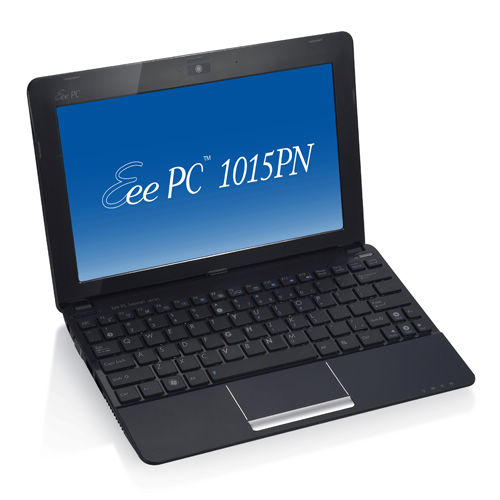
Eee PC 1015PN – Dual core CPU & discrete graphics for unprecedented performance
- Genuine Windows® 7 Home Premium
- Genuine Windows® 7 Starter
- Dual core Intel® Atom™ N570 processor
- Next Generation NVIDIA® ION™ discrete graphics offers better graphic performance and video experience
- Enjoy Full HD 1080p video playback on an HDTV or big screen via an HDMI port
- Enjoy long-day-computing with 10 hours battery life
- Easy Mobile Connectivity with built-in 802.11n and Bluetooth 3.0
- Complimentary 500GB ASUS WebStorage
Specifications
| Operating System | Genuine Windows® 7 Starter |
| Display | 10.1″ LED Backlight WSVGA (1024×600) Screen |
| CPU | Intel® Atom™ N570 Processor |
| Graphic | NVIDIA® ION N11M-PT1 (512MB VRAM) |
| Memory | DDR3, 1 x SO-DIMM, 1GB ( Maximum 2GB ) |
| Storage | 2.5″ SATA 250GB HDD 500GB ASUS Web Storage |
| Wireless Data Network | WLAN 802.11 a/b/g/n@2.4GHz Bluetooth V3.0 |
| Camera | 0.3 M Pixel Camera |
| Audio | Hi-Definition Audio CODEC Stereo Speakers High Quality Mic |
| Interface | 1 x VGA Connector 3 x USB 2.0 1 x LAN RJ-45 1 x HDMI 2 x Audio Jack (Headphone/Mic-In) 1 x Card Reader : SD/ SDHC/ MMC |
| Battery | 6-cell Li-ion Battery Pack- 6cells 10hrs (6cells, 56W/h) battery life |
| Dimensions | 262 x 178 x 23.6 ~36.4 mm (WxDxH) |
| Weight | 2.76 lbs. | 1.25 Kgs |
| Color | Matte : Black, Blue, Red Glossy : White |
Soruce : http://www.bestnetbooksbuy.com
Wednesday, December 7, 2011
ASUS Eee PC 1015PN Netbook (ep.1)
Description
 The new Dual-Core Netbook: Recast of the Mobility
All you could ask for a netbook, the new 10.1-inch Eee PC Seashell
1015PN-PU27 answers. The Eee PC 1015PN-PU27 has both performance and
mobility to provide the perfect blend of multitasking productivity, with
a rich multimedia and Internet experience. It features the new Intel ®
Atom ™ N570 dual-core processor and a 10.1-inch matte screen to give you
great all the power necessary for on-the-go fun. Add to the LED backlit
screen and ASUS Super Hybrid Engine, you can stay unplugged until 9.5
hours between charges. And with NVIDIA Optimus, the Eee PC 1015PN-PU27
intelligently switches between the NVIDIA ION and embedded graphics to
maximize battery life without compromising performance. With sustainable
mobility, it has a compact and scratch-resistant mat that fits
perfectly in the briefcases and backpacks ideal for long trips or daily
errands.For added comfort, it comes with Bluetooth v3.0 for up to 160 times faster data transfer rate between Bluetooth devices. In addition, you get unlimited ASUS WebStorage space and 250 GB hard drive disk space for store, share and store your music, videos and other valuable data. The Eee PC 1015PN-PU27 comes with chiclet keyboard size, stereo speakers, high-speed Wireless-N, 1 GB of DDR3 memory, and Windows 7 Starter.
Key Features
- 10.1-inch LED-backlit display for crisp visuals wherever, whenever
- Intel Atom N570 dual-core processor that’s specially designed for a netbook to deliver responsive multitasking performance on the go
- 750GB Hybrid Storage: 250GB hard drive and 500GB of ASUS WebStorage that easily backs up and shares your data anywhere you have Internet access
- ASUS Super Hybrid Engine maximizes battery life up to 9.5 hours between charges
- High-speed wireless N and Bluetooth v3.0 for fast Web surfing and enhanced Bluetooth peripheral connectivity
 Designed to keep you moving
With a design ethos that stems from the thin and light Eee PC ™
tradition, the Eee PC ™ Seashell 1015PN has entered a new phase, with
more rounded curves to give a more simplified. Add to this a game of
contrasts of light and shadows, and a variety of colors, 1015PN came
into its own effect.Ideal for the traveler, the Eee PC ™ Seashell lightweight and compact 1015PN means it will easily fit in your hand luggage. The 1015PN is the hiker’s companion, accompany you to the adventures in foreign lands. And with access to cloud computing, you’ll be able to access your video or music files online, or surf the net to update your blog to tell the world you travel. The 1015PN ensures you will not be bored while in transit at the airport.
 Comfort On-the-Go
The Eee PC 1015PN-PU27 has more surface area for a wider wrist
comfort. The ergonomic chiclet keyboard is huge, with concave keys that
direct your finger to the center of the surface. Weighing less than 2.76
pounds (with battery), the Eee PC 1015PN-PU27 is compact you can use it
on a plane or any other confined space with room to spare. The
multi-touch trackpad lets you easily zoom in and out to view photos or
read documents simply by dragging two fingers together or separately.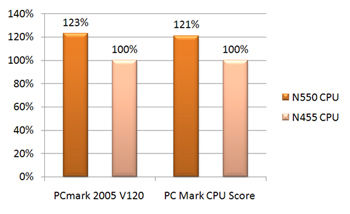
Faster than ever – Atom N550 Dual Core Processor
The Eee PC ™ 1015PN marks a radical departure from other netbooks which usually have simple heart Atom ™. With its Intel ® Atom ™ N550 dual core processor, the Eee PC ™ 1015PN set new performance standards netbook. More importantly, this processor double heart breaks conventions netbook today by offering a rich experience in performance. In terms of performance, the 1015PN is clocked at a speed of at least 23 percent faster than the simple netbooks *** processor.
 Power with Enhanced Battery Life
Equipped with Intel Atom N570 dual-core processor, the Eee PC
1015PN-PU27 supply more responsive multitasking performance without
compromising battery life. Moreover, the ASUS Super Hybrid Engine allows
you to instantly switch between power profiles to optimize the system
for your task. Use the Eee PC 1015PN-PU27 to a maximum of 9.5 hours
between charges * to stay productive on the go.
Saves energy and the planet – 10 hours * of battery life with Super Hybrid Engine
The Eee PC ™ Seashell 1015PN consumer responses to the needs of a netbook that has a stylish design with long battery life. The 1015PN has 10 hours with the battery life * ASUS-exclusive Super Hybrid Engine technology. It intelligently adapts and adjusts power settings to give you the CPU performance you need. Based on the user settings and applications running, tailors, IT power requirements appropriate for the task at hand to ensure maximum efficiency.
 Immersive multimedia
The Eee PC 1015PN-PU27 has a 10.1 inch WSVGA LED-backlit matte
display and stereo speakers, so you can enjoy movies, videos and photos
of a sharp, clear quality. With a matte screen LED backlit, you will
experience clear images streaming content on-the-go without distracting
glare particularly useful when you are out. In addition, the LED backlit
screen saves energy for the battery life longer and provides brilliant,
better than the visual display without it.Now with NVIDIA Optimus, the Eee PC 1015PN-PU27 intelligently switches between NVIDIA ION graphics processor and Intel integrated graphics to give you maximum battery life without compromising performance.

 Satisfied with the unprecedented performance of energy efficiency
The Eee PC ™ 1015PN defies the notion of netbooks being designed just
to meet basic computer. The 1015PN packs the Intel ® Atom ™ N550 dual
core processor and next-generation NVIDIA ® ION ™ graphics processor
with discrete NVIDIA ® Optimus ™ technology to deliver a netbook with
powerful capabilities of multimedia performance.The next generation NVIDIA ® ION ™ discrete graphics processor in the Eee PC 1015PN ™ allows it to offer a visual experience never before seen on netbooks. The 1015PN is capable of smooth, clear video playback in 1080p high definition on an HDTV or large screen via a HDMI port.
NVIDIA ® Optimus ™ technology* intelligently switches between discrete and integrated graphics to provide the optimal graphics needed, thereby extending battery life in the process. (* Only with Windows ® 7 Home)
 Ergonomic design for you
The Eee PC ™ Seashell 1015PN boasts a sleek and aerodynamic shape
with strongly defined. ASUS approach to innovation means that your
material will be available 1015PN with a smooth matte or high gloss
coating ****. It features an ergonomic chiclet keyboard and a 10.1 “LED
backlit WSVGA (1024×600) to ensure ease of use even after prolonged use.The 1015PN also offers a camera lens on the front of the webcam to give you added privacy.
 High speed, efficient connectivity
Built-in 0.3 megapixel 1015PN of webcam you can videochat with
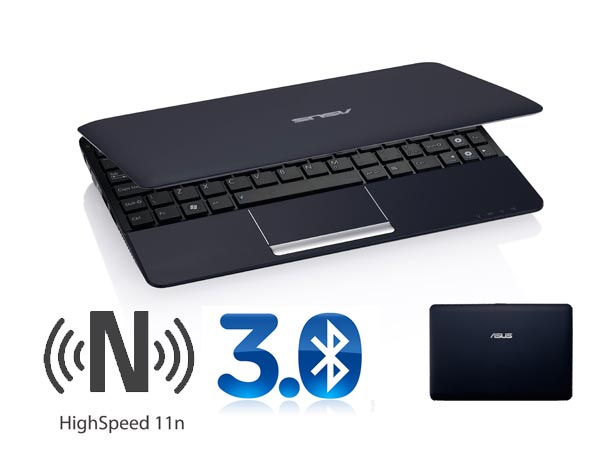
friends and family a world away. Wi-Fi 802.11n and Bluetooth 3.0 ensures
that you are connected even when you’re on the go. Bluetooth 3.0
 Your Companion portable Internet
Not only is the Eee PC 1015PN-PU27 has a 250GB hard drive, it also
comes with an unlimited space of complementarity ASUS WebStorage. ASUS
WebStorage, it is easy for users to share media with friends and family
via a simple drag and drop interface and online so you can backup your
data and access it anywhere online.Connect, communicate and explore online with features that turn your wireless world. High-speed Wireless-N connectivity is six times faster than 802.11b / g to surf the Web Snappy between your favorite sites and streaming video faster. Bluetooth V3.0 gives transfer rates 160 times faster to your Bluetooth devices for synchronization of data faster and more reliable connections. The integrated webcam with lens cover and microphone lets you Skype face-to-face with friends, family and colleagues in crisp, clear quality.
Cloud computing: Imagine, Access, and do more with ASUS ‘Cloud Computing Service Home Eee
Every Eee PC 1015PN comes with the platform exclusive ASUS Eee Docking that serves as a practical one-stop solution that gives you easy access to digital content, services and other useful software.Access allows you to stream or download a variety of exciting digital content. It includes ASUS @ Vibe, Game Park, ASUS WebStorage **** and ASUS AP Bank.
Easy sharing allows you to keep all your photos, music, videos, documents, bookmarks, and more in tune and up to date on all your computers. It includes YouCam and Syncables.
The experience includes a variety of applications that enhance the Eee PC’s audio visual performance. It includes Splendid and SRS.
Tools has a suite of useful tools such as live update, Font Resizer, LocaleMe, sitting home that enhance your user experience Eee PC.

* Operation lifetime subject to product model, normal usage conditions and configurations.
** Free one-year 500GB ASUS WebStorage. Please visit www.asuswebstorage.com for more details. Specifications are subject to change without notice. Please visit www.asus.com for more information.
*** Comparisons made with an Intel Atom N455 processor core simple test performed by PC Mark.
**** Availability is dependent on the support model, country or the selected operator. Check with your local ASUS website for more details.

Soruce : http://www.bestnetbooksbuy.com
Monday, December 5, 2011
Toshiba NB505 Netbook (ep.5)
Good netbook with full keyboard
Great little netbook at an affordable price. Specs are pretty standard for a netbook 2010/2011: 1G RAM, 250GB HD, 3 USB ports, a video camera base, separate Mic & headphone jacks, SD card slot, VGA output and a very useful self-8am.There are many such netbooks on the market, but what really stands out for me on this one is the keyboard, the keys FULL size with all the main cursor movement keys: DEDICATED up, down, right, left , PgUp, PgDn, HOME and END. I work a lot with Excel spreadsheets and it is really uncomfortable to move by pressing Fn + end / ORF to the end + / down or ctrl + fn + home, ctrl + fn + end, etc to get around. Also scrolling with PgUp / PgDown while reading a web page is the duration of pain when you have to press the fn key too! With most netbooks you have to live with the Fn key, and not in this case, the NB505 keyboard is really convenient and comfortable, almost like a full laptop or PC keyboard, even to the position of the keys is not standard, they allow you to make the job easier and faster.
I also love the feeling of the event: as some very soft rubber cover is very nice and handles nice!
Windows 7 Starter is really basic, but you can find programs, public services and advice on the Internet to take care of the base “missing features” such as changing the background image, colors, sounds, resize images, and so I got rid of most of the Toshiba Utilities and Norton, and installed MS Security and my favorite freeware utilities Home Edition.
I wish I had stereo speakers, but the netbook includes only a mono speaker in the unit.
I no longer have the Toshiba laptop with an excellent experience, in fact, they are still working (WIN98, 450MB HD, 64MB RAM)! So I decided to take the risk and bought the netbook from Amazon. It arrived quickly, and working OK! (No DOA).
Its been a month since I had the netbook and I’m always happy, but I think I’ll put the memory to 2 GB, to do smoothly, I think Win7 heavier than Win XP 1 GB of RAM (but it’s just my opinion …).
Overall, I recommend it to my friends!
Saturday, December 3, 2011
Thursday, December 1, 2011


Subscribe to:
Posts (Atom)